
RCOT Communities Mobile App

Connect, share and learn – anywhere, anytime
The new RCOT Communities app brings our professional online community directly to your smartphone.
Developed in response to member feedback, the app improves accessibility, convenience and engagement – helping you stay connected to the conversations and people that matter most to you.
Whether you’re looking to share practice insight, take part in community led CPD, or simply keep up with what’s happening across your networks, the app gives you greater choice in how you engage with RCOT Communities.
A smarter way to engage with your community
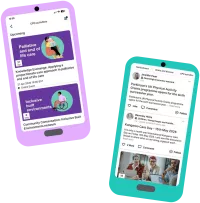
- Personalised community feed – See the latest posts from all your communities in one place as soon as you log in.
- Easy interaction – Like, comment, or jump into full discussions directly from the feed.
- All communities features included – Search people and content, message members, join communities, and access CPD activities and projects.
- Flexible notifications – Customise email and push notifications by community or activity type.
- Improved accessibility – Works seamlessly with your device’s built‑in accessibility tools for a more inclusive experience.
Having an app for RCOT Communities has significantly improved accessibility and efficiency in engaging with professional discussions. The ease of access means I can respond more quickly and stay actively involved, making communication far more agile and responsive. Overall, the app enhances both productivity and connection within the communities, making it a highly beneficial tool for members.
Image
Dr. Natalie Jones
Research lead for RCOT Primary Care practice network
How to get connected
Ready to connect with your community?
Just follow the steps below to activate your account and access the RCOT Communities app.
1. Check you’ve activated your RCOT account
If you haven’t logged in before, please visit the RCOT website, select 'Activate now', and follow the instructions. (If you have already logged in, you can skip this step.)
2. Download the RCOT Communities app
Search for ‘RCOT Communities’ in the Google Play Store (Android) or Apple App Store (iPhone) and tap 'Install' when you see our logo.

3. Log in and get networking
Once installed, open the app and select ‘RCOT members click here’. If prompted, log in to your RCOT account via the website, then return to the app to access the platform and join the conversation with fellow members.